Welcome back to Week 2 of our 3 Month Beginner Friendly Secure Coding Series in Python. If you followed Week 1, you now know Python basics such as variables, data types, user input, output, and indentation. We also built a simple calculator to apply everything we learned. If you have not done so yet, please go back and read Week 1 before moving on to this one.
Alright! this week, we are going to level up our logic skills and make our programs smarter using if/else, loops, and a bit of data handling. From now our programming will starts feeling more real, we can build programs knows when to stop, check user input, and store data in memory. The goals is we will learn first if/else statement, for/while loops. and I will making it more engaging by asking questions in the mean and at the end, we will perform a weekly project, just like we did in the previous week by writing a Simple Calculator in Python. This project will contain all the learning we covered previously and in this post.
Let’s start..
If / Else / Elif Statements and Logic in Python
In Python, we use if else statements to control the flow of a program by making decisions. They allow the program to check whether a condition is true or false and then execute different blocks of code based on the result. For example, if a user enters the correct password, the program can grant access; otherwise, it can display an error message or an else message. This is important because real-world programs often require different outcomes depending on certain situations or to handle errors. Without if-else statements, programs would only run in one straight path and would not be able to respond to different inputs or conditions.
Example:
if (ThisCondition):
    print("Print this line")
else:
    print("Otherwise print this")
Example:
students = 600
if (students > 300): #-students-greater-than-300
	print("More than enough students are enrolled")
else: #-if-less-than-300
	print("Less students! We need more enrollments")
Sometimes we have more than two conditions, so we use the elif statement. Below is a simple program to display temperature with the help of if, elif, else statements:
temperature = int(input("Enter the temperature: "))
if temperature > 30:
    print("Its hot outside!")
elif temperature > 20:
    print("Its a nice day.")
else:
    print("It's cold.")
Write and save this code in a python file temperature.py in VS-Code. and then run it.
The program will ask a user to enter the temperature as int. Let’s say the user inputs 31, then it will print Its hot outside!. If you (user) enter greater than 20 (between 20-30), then it will print Its a nice day.
Question: What if a user says something above 30, like 100, 90, or +200, -200? What will be the answer? Please think, look at the program, and answer honestly, then go down below to see the answer.
Try it yourself…
Answer: it will print its cold.
But wait, do you think that is really correct and will it be cold? No, our program is not well written. Why? Well, it is because we did not add enough options. Let’s say if a user enters in the 100 range, then it should be too hot instead of saying it is cold. In the same way, from 0 to -100 it should be its too cold. I am not going to write a lengthy program on this, but as you gain a basic understanding and build logic, you will definitely understand and write your own program and add more conditions to make it better. Next, I am going to give you some tasks to complete it.
Task: Write a simple or copy the upper given if/else program, then try to enter alphabets instead of numbers. Try to enter symbols and look at the answer, what it does. Then try to fix it.
Example: If the user inputs a character instead of a number, the output should display a proper, user-friendly error message. Similarly, if the user inputs symbols instead of numbers, there should also be an error message in the output. Try this out, search on Google if you can figure it out; if not, no worries, we will cover the Error Handling topic in upcoming posts.
Overall, my main purpose is that you try to break the code logics. Think outside the box, do not just limit yourself to listen to the code and do the same. Once you learn how to break code logics, then you will be a good developer who can write secure code. I hope now the if else statement is clear. If still not please visit W3schools.org if else topic to get more better understanding with practical examples.
Loops in Python
Now let’s move to the next topic of our Week 2 in series, which is Loops. Loops in Pythonor in any programming language are used when we need to repeat a block of code multiple times, which makes our programs shorter, cleaner, reusable and more efficient. Loops automate the process, instead of writing the same instructions again and again. For example, if you want to print numbers from 1 to 100, without using loops you would have to write 100 lines of code like print(1), print(2), print(3) and print(n). But with a loop, you can achieve the same result in just 2 lines of code. Loops are especially useful when working with large sets of data, performing calculations, or running tasks until a certain condition is met. They make programming faster, easier to maintain, and help solve repetitive problems with very little code. There are two main types of loops in Python: the for loop and the while loop.
For loop
A for loop is a control flow statement for specifying iteration, which allows code to be executed repeatedly. The for loop in Python is used when you want to repeat an action a specific number of times or go through a collection of items like a list, string, or dictionary.
With help of loop, your program repeat actions without rewriting code, and this can be done using a for loop. Example:
for x in range(5):
    print(x)
Write and save this code in a python file for-loop.py in VS-Code. and then run it.
Output:
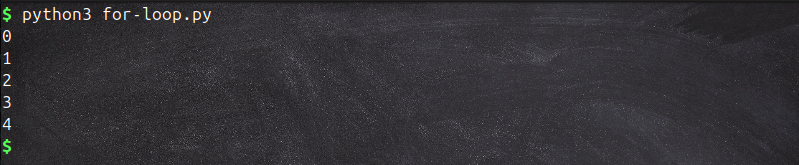 A, range(5) simply gives numbers from 0 up to 4, and the loop goes through them one by one. So the print statement runs 5 times automatically. Keep in mind that in programming it start from 0 not from 1 so in our program as you can see it print 5 digits if we count from 0-4 but if you want to print 0-5 then in upper program replace the
 range(5) with range(6).
While loop
The while loop in Python is used when you want to keep repeating something as long as a certain condition is true. For loop knows exactly how many times it will run but the while loop continues running until its condition becomes false.
Example of a while-loop asking user to enter a password:
password = ""

while password != "passwd123":
	password = input("Enter your password: ")
print("Correct password")
Write and save this code in a python file while-loop.py in VS-Code. and then run it.
Output:

What is the difference between for loop and while loop and where to use?
Well, in Python, both for loop and while loop are used to repeat code, but they work in different ways. A for loop is used when we already know how many times we want to repeat something or when we want to go through items in a sequence like a list, string, or range. For example, if you want to print numbers from 1 to 10, a for loop is the best choice. On the other hand, a while loop is used when we don’t know in advance how many times the loop should run and we want it to continue until a certain condition becomes false. For example, if you want a program to keep asking for a password until the user types the correct one, a while loop works better.
Example code for password checking to give you more clear concept of using while loop.
password = "python123" # this is the correct password to grant acces
user_input = ""

while user_input != password:
    user_input = input("Enter password: ")

print("You are In")
Write and save this code in a python file while-password.py in VS-Code. and then run it.
In this code, we already know that the password is python123. Whenever the user’s input does not match the one we initialized, the program will keep prompting with Enter password:, Enter password:, Enter password:until the user enters the correct one.
Below is the screenshot for a better understanding of the output:
 Now you need to practice more and clear your concepts on this and try to write some small program on
 for loop and while loop. I hope the looping concept is now clear. For more practice and better understanding, I recommend again visiting W3Schools.org or just google it “Python for loops and while loops” and explore it in detail. Once done then we are moving to the next topic which is List and Storing Data
Lists in Python
In Python, a list is a data structure used to store multiple items in a single variable. Lists are very flexible because they can hold different types of data, such as numbers, strings, float or even other lists. They are ordered, which means the items have a specific sequence, and each element can be accessed using an index starting from 0, (the first item index is 0 not 1). For example, a list of student names or a list of numbers can be stored and reused easily in a program. Lists make storing, organizing, and manipulating data much simpler since you can add, remove, or change items whenever needed.
Example:
myList = [] #-this-symbol-is-used-for-lists
myList.append("Welcome to Secure Coding Series")
myList.append("Practicing Python")
print(myList)
Write and save this code in a python file lists.py in VS-Code. and then run it.
Output:

Another example from W3schools to Create a List:
thislist = ["apple", "banana", "cherry"]
print(thislist)
Output
 Their are many other pythons lists which is better to take idea from this article W3schools https://www.w3schools.com/python/python_lists.asp
List Methods
Additionally, please study about list methods. You can easily find many resources on Google. Also, take some time to explore. I want you to discover and learn those by yourself.
Dictionaries in Python
In Python, a dictionary is another built-in data structure that is used to store data in key-value pairs. Like in lists, where we access items using an index number, in dictionaries we use a key to access its value. Dictionaries are very useful when we want to link one piece of information with another. The format is: key:value and inside curly braces {}. Additionally, dictionaries are ordered: When we say that dictionaries are ordered, it means that the items have a defined order, and that order will not change. Unordered means that the items do not have a defined order, and you cannot refer to an item by using an index. Changeable/mutable: Dictionaries are changeable, meaning that we can change, add, or remove items after the dictionary has been created. Dublicate: Dictionaries cannot have two items with the same key (duplicate keys). This means we can add, update, or remove items whenever needed, but each key must be unique. As compared to lists, dictionaries are useful if you have a large amount of data because you can easily call a value using its key. But in a list, you have to use the index value. Now imagine if we have 500 entries, how would you print any specific value inside that big list? I hope it is clear now.
Note: As of Python version 3.7 or above, dictionaries are ordered. In Python 3.6 and earlier, dictionaries are unordered.
Dictionary example:
mydict = {
  "Name": "Aziz",
  "Grades": "A",
  "DoB": 1923
}
print(thisdict["Name"])
Write and save this code in a Python file named dict.py in VS Code, and then run it.
We are printing the "Name" value from the dictionary. You can print any other value if you like.
Or we can write dictionaries like this in one line also:
student = {"Name": "Aziz", "age": 78, "course": "Python Secure Coding"}
print(student)
each key:value should be separated with a comma.
You can learn more here: W3schools.org Python Dictionaries
Dictionaries Methods
Please study about dictionaries methods. You can easily find many resources on Google. Also, take some time to explore Python tuples on your own. Additionally I want that you also explore python sets and set methods as well.
ToDo List - Mini Project
I have Coded an Interactive To-Do list mini project and applied all the learning which we have covered in this week which is if/else statements, for and while loops, dictionaries, and lists.
todo.py
tasks = [] # this is list

while True: # our while loop start here
    command = input("Enter a command (add/show/remove/exit): ")

    if command == "add":
        task = input("Enter a new task: ")
        tasks.append(task)
        print("Task added.")
    elif command == "show":
        print("Your Tasks:")
        for t in tasks:
            print("-", t)
    elif command == "remove":
        task = input("Enter the task to remove: ")
        if task in tasks:
            tasks.remove(task)
            print("Task removed.")
        else:
            print("Task not found.")
    elif command == "exit":
        print("Exit Program!")
        break
    else:
        print("Unknown command, try again.")
Write and save this code in a python file todo.py in VS-Code. and then run it.
Now the program may look lengthy and complicated but it isn’t I have just added more features to make it more interactive which gives us a developer feelings :). The code contain three main things which I have added:
- I have used for loop and while loop to keep the program running.
- I have used if/else statements to handle commands (add, show, remove, exit).
- And at the end store tasks in a list.
Here what the output looks like and how a user can input data:
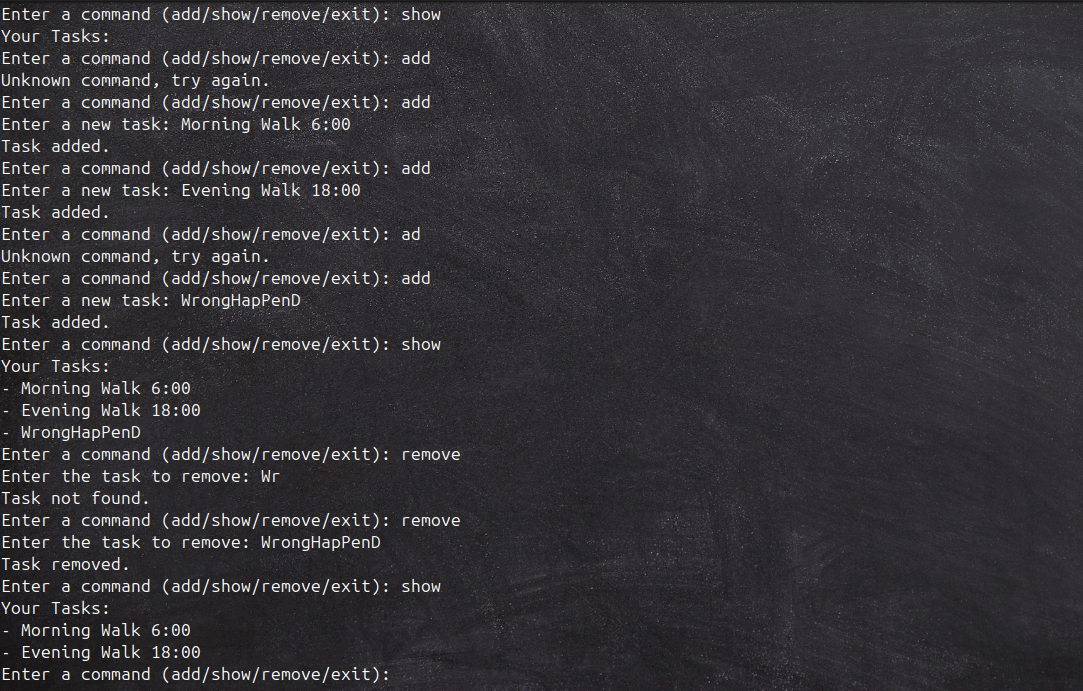 Now, if you look above, I have tried both correct and wrong inputs just to test the output and see how it is handled. Things are working fine for now, and I think no further explanation is needed here.
Alright! If you have done this and cleared your concepts till these topics so far… Congratulations!
Now I want that you should practice Week 2 topics by writing a small project and applying what we have learned so far… just like the one I did, but change the idea. And don’t forget to try breaking the program, try weird inputs (numbers, empty strings, large strings), use symbols instead of numbers, use numbers where characters are required, and then try to fix the code if needed. Practice is a must. Without practice, you will just feel like, 'Oh, that’s easy, I can do it in mins,' but that doesn’t work. Practice make you perfect andThe more you practice, the better you will get, which is true.
Book Reading
Before ending as I have mentioned in our first post that we will be following a book Designing Secure Software A Guide for Developers by Kohnfelder. This is completely optional and we are just following it to build some high level concepts. if you have not read and not interested then no worry I am summarizing the chapter 1 for you in short.
This first chapter focuses on shaping the right security mindset before writing to code. The main idea is that secure software doesn’t come from just adding protections at the end, it starts from the very beginning, with the way we think about threats, users, and the systems we depend on.
-
Security is part science, part art. its not just about following strict rules, checklists, or compliance requirements. It’s also about judgment, learning to think like an attacker, predicting where things might go wrong, and imagining how users could unintentionally misuse the system. A strong security mindset means constantly asking, What could go wrong here?
-
Trust is everything. Every program we write relies on a massive stack of components that we did not build ourselves: operating systems, compilers, third party libraries, and even the hardware. We have no choice but to trust these, but that trust should not be blind. Instead, we should carefully evaluate what we are relying on, reduce unnecessary dependencies, and understand the risks tied to the ones we do use.
-
C-I-A Triad: This is the core of information security.
- Confidentiality: Keeping data secret and making sure sensitive information is not leaked.
- Integrity: Ensuring data remains correct and is not altered by unauthorized users.
- Availability: Keeping systems functional and accessible, preventing attackers from disrupting services.
-
The Gold Standard: This is how we enforce security.
- Authentication (AuthN): Proving who someone is.
- Authorization (AuthZ): decide what they are allowed to do.
- Auditing: Recording who did what and when, so there is accountability and traceability.
-
Privacy matters too. Security is not only about defending systems but also about respecting users’ data. This means thinking carefully about what data we collect, how we store it, and when we delete it. A good rule of thumb: collect as little data as possible, and once it’s no longer needed, get rid of it securely.
-
Big lesson for developers: Trust should never be treated as black and white. Instead, think of it as a spectrum, some systems and components may be highly trustworthy, others much less so. Don’t assume, and don’t ignore logging and auditing. Build your software in a way that if something goes wrong, you can trace back what happened, learn from it, and prove accountability.
You need to ask yourself!!
- What if the user types something unexpected?
- What if they type in all caps?
- What if they just hit enter?
- What if a user input something weird (numbers, empty strings), symbols instead of numbers, numbers where characters is required.
- What if they reverse enigineer our applicaition?
- Think like an attacker break the code and then try to fix.
That’s it for week 2 I hope it helps you and you have gained some knowledge, Next week we will delve more into lists, loops and our new topic which will be Python Functions. If you have any questions, recommendations and improvement please feel free to reach out to me on LinkedIn: https://www.linkedin.com/in/aziz-u000/