Security Misconfiguration
Hi everyone, welcome back once again. Today, we are going to understand the Security Misconfiguration vulnerability, which is listed as the #2 item in the OWASP Top 10. Why is this vulnerability in second place?? Well we will study and understand it in depth today in this post. Before starting, I have a note: As you know, our 12 week secure coding series in Python has reached its end with this post. At the end of the post, I have a farewell message where I will share some resources and tips for you, so dont miss out.
let’s start.
What is Security Misconfiguration!!
A very simple explanation of misconfiguration refers to the state of a system, application, or infrastructure when its security settings are improperly defined, implemented, or maintained, leaving it vulnerable to attacks. It occurs when default or insecure configurations are not updated, unnecessary features remain enabled, or security controls such as access permissions, patches, and authentication mechanisms are inadequately applied. Common examples include using default passwords, failing to disable unused services, leaving network ports open, or not applying timely security updates, all of which can provide attackers with easy entry points to access sensitive data or disrupt operations. These misconfigurations can occur across any layer of the technology stack, including cloud environments, web servers, databases, network devices, and mobile applications, and are a leading cause of data breaches and cyber attacks. For now, this explanation is sufficient to understand the concept. We will dive deeper later in this post with practical examples as well.
MORE!!
Today, we are looking at the broad subject of security misconfiguration. There are many ways configuration can go wrong. We are going to examine the areas where configuration can impact your website. Once you see all the different areas, you will start to realize how much configuration there is that can go wrong. We will then go into more detail on the common configuration problems that are likely to occur on a website, their mitigation, and we will also cover the practical part by hacking PyGoat, an intentionally vulnerable Django based web application.
First, we will look at verbose errors coming from a website and why they are dangerous. We will then examine security headers that should and should not be used in responses from your website. We are also going to take a look at the admin area of a website and provide recommendations for keeping it secure. We will also review some basic misconfiguration fixes. We will not cover defenses for verbose errors with practical code, but we will at least understand the concept and how security headers can be implemented.
Configuration at the Transport and Server Level
When someone connects with your website, we need to think carefully about the TLS connection and the types of encryption it allows. This includes considerations such as using the latest version of TLS, which is currently version 1.3, or determining whether older versions should still be supported for compatibility reasons. The security landscape is constantly evolving, and over time, the recommendations for these configurations do change. What was considered secure a few years ago might now be vulnerable to modern attacks, so staying updated with current best practices is essential.
Then, as we get to the server itself, there are multiple components running on there that require our attention. These include the operating system, which forms the foundation of your server infrastructure. You might also have services like FTP for file transfers, SSH for secure remote access, and potentially a lot more services depending on your specific needs and infrastructure setup. Each of these components has its own configuration settings and security considerations. These all need careful thought about how they are configured to ensure they are not introducing vulnerabilities into your system.
Beyond just the initial configuration, there is the critical aspect of patch management, which affects all of those components we just mentioned. Software vulnerabilities are discovered regularly, and vendors release patches to fix these security issues. Question: are your systems being patched when newer versions come out? A well configured server that is never updated can quickly become vulnerable as new security flaws are discovered.
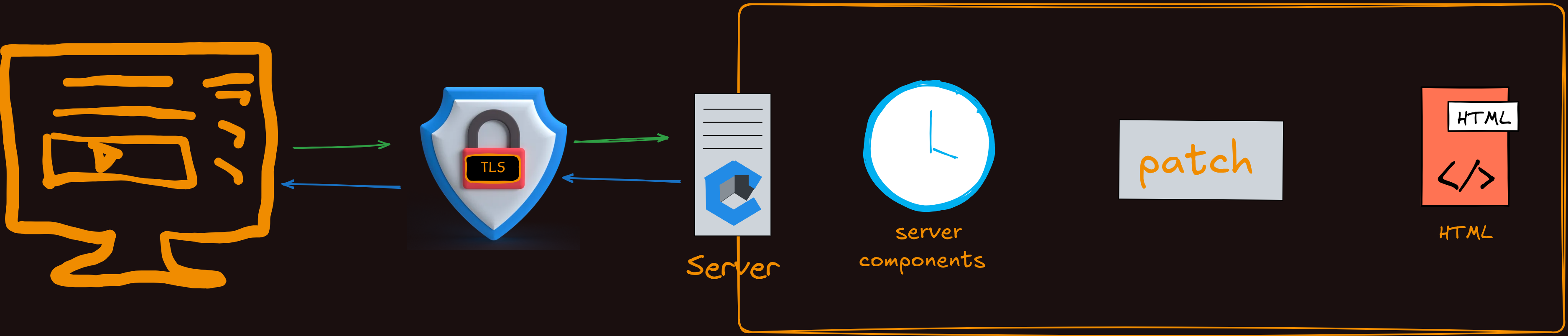 Looking at that in more detail, we see that we have got similar security considerations within the web application layer itself. Your website is made up of various components and dependencies, perhaps including libraries, frameworks like Django in our case, and programming language versions like Python. All of these components have their own security vulnerabilities that are discovered over time. They all need proper patch management too, which means regularly checking whether they need to be upgraded to newer, more secure versions. Just like with server level components, keeping your application dependencies up to date is essential for maintaining security. Outdated libraries and frameworks are common targets for attackers because their vulnerabilities are well documented and easy to exploit.
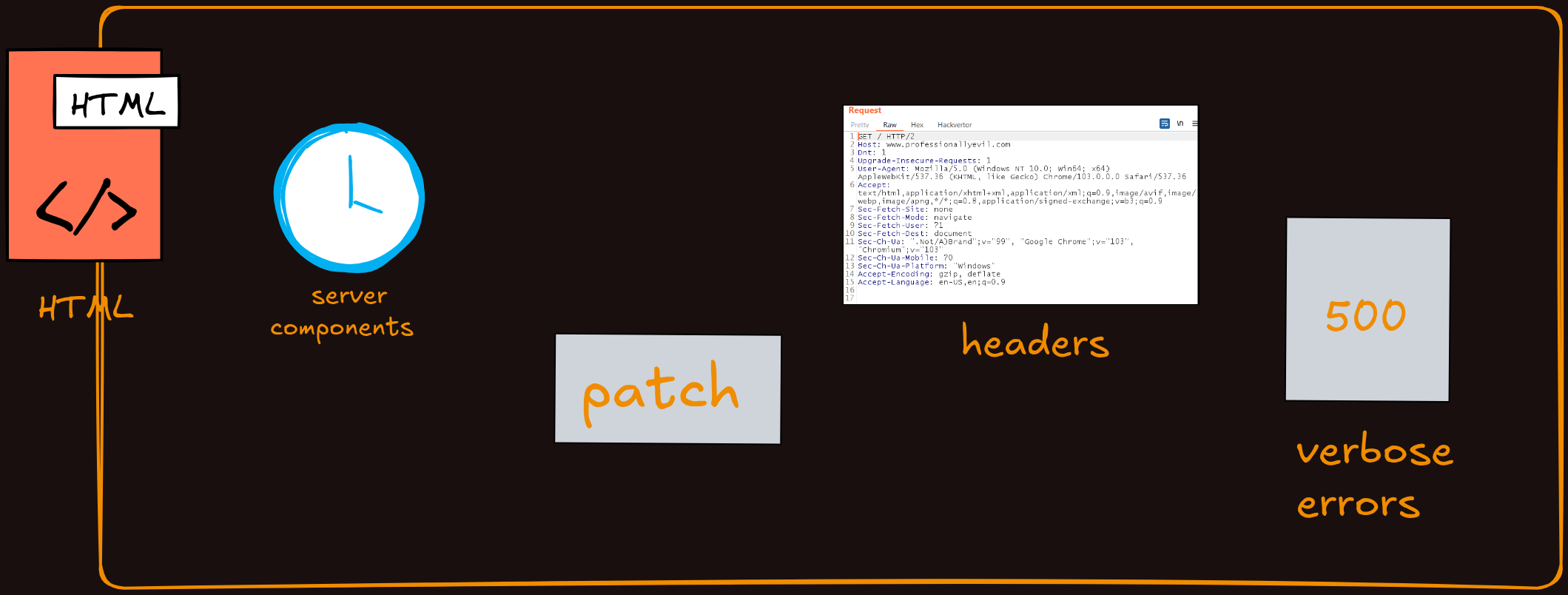
next we are thinking about things like response headers. These HTTP headers that your server sends back with every response have a lot to do with the security of a website. Headers like Content-Security-Policy, X-Frame-Options, and Strict-Transport-Security can provide significant protection against various types of attacks when configured properly. Because they play important role, It is important for us to try it and taking the time to understand what each security header does and implementing them correctly can prevent many common web vulnerabilities.
Verbose errors
Uncaught exceptions coming out of your website can be a serious security risk that many developers overlook. When errors occur in your application and are not properly handled, the output can include highly sensitive information like database connection strings, which contain usernames, passwords, and server addresses. Stack traces from your code can also be exposed, revealing the internal structure of your application, file paths, function names, and the flow of execution. All of this information can significantly help an attacker understand how your application works and identify potential vulnerabilities to exploit.
While these detailed error messages are useful in a development environment where you need to quickly identify and fix bugs, they should always be disabled in production systems. In production, you should configure your application to show user friendly error messages that do not reveal any technical details. Instead of displaying the full error to the user, log the complete error information securely on the server where only authorized personnel can access it for debugging purposes.
Security Headers
Security headers are part of web responses that tell the recipient various things about the response. cookies such as Referrer-Policy, Strict-Transport-Security, Cookie Security Attributes, Content-Security-Policy etc. These are just a small selection of the security headers you can use to protect your web application. Other important headers include X-Frame-Options, which prevents clickjacking attacks by controlling whether your site can be embedded in frames, and X-Content-Type-Options, which prevents MIME type sniffing attacks. Taking the time to properly configure these headers is an important part of building a secure web application and should be considered essential, not optional. And how it should be handled. Some of those headers are specifically designed to enhance security. A lot of them are talking to the browser and telling it how to act when processing the content from your website.
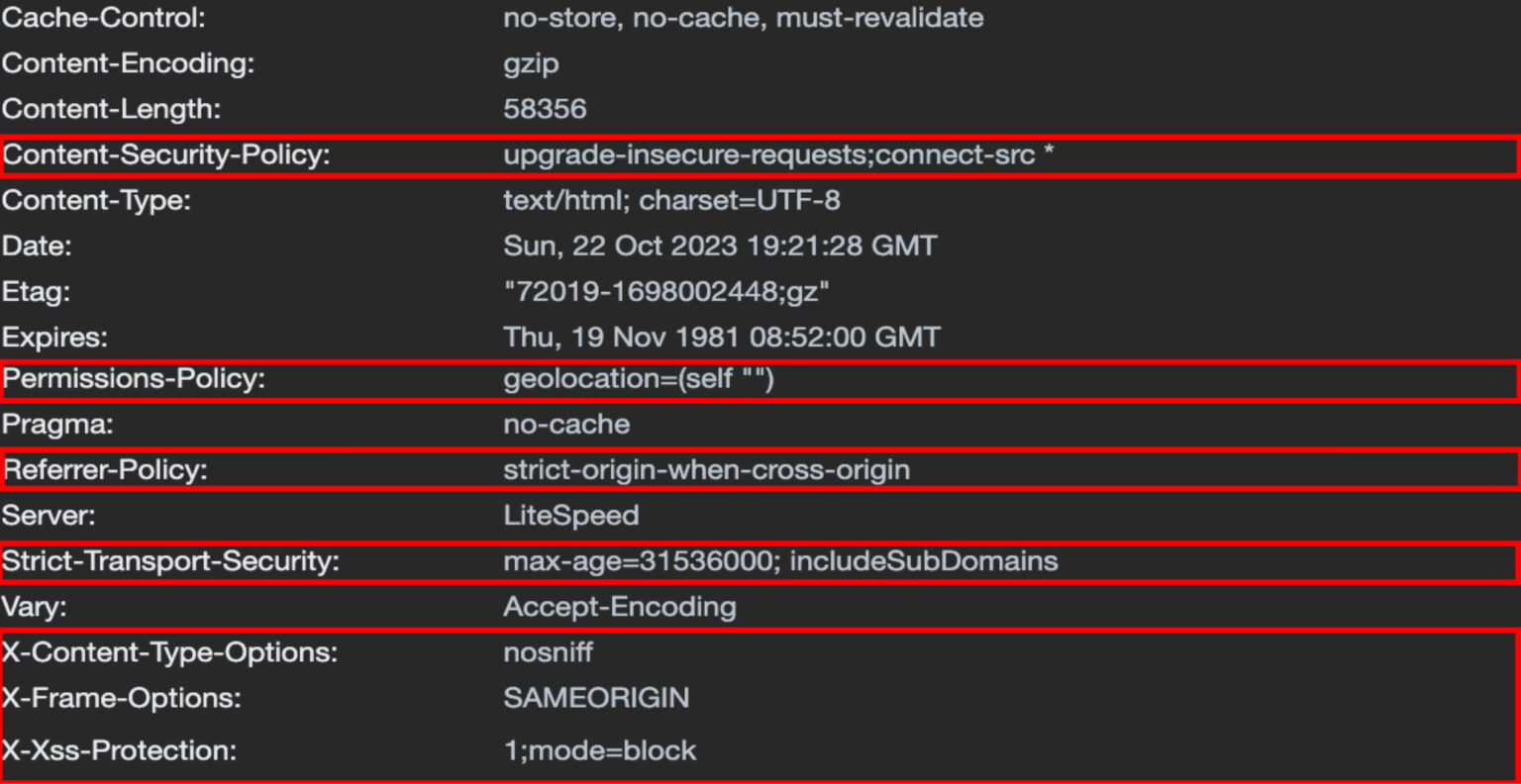 image: https://docs.litespeedtech.com/lsws/security-headers/
Information headers
The information headers is the Server header that gets returned by web servers in their responses. Look at the below example of a header from an Amazon S3 bucket. You can see it just shows the server type, which is Amazon S3, without revealing too much additional information. However, sometimes it can be risky if this header shows detailed information, such as “Apache/2.4.29” or “nginx/1.14.0” along with the specific version number being used. This level of detail becomes a security concern because it tells potential attackers exactly what software and version your server is running.
If, for example, a known vulnerability was discovered and publicly disclosed in a specific version of Apache or Python, then an attacker scanning your site would immediately know that your website is vulnerable to that particular exploit. They can then use existing tools and techniques designed to exploit that specific vulnerability without having to do much additional reconnaissance. This makes your server a much easier target. It is therefore considered best practice to remove or modify the Server header to provide minimal information. Many web servers allow you to configure this header to show only generic information or to suppress it entirely. Not all headers are good for security.
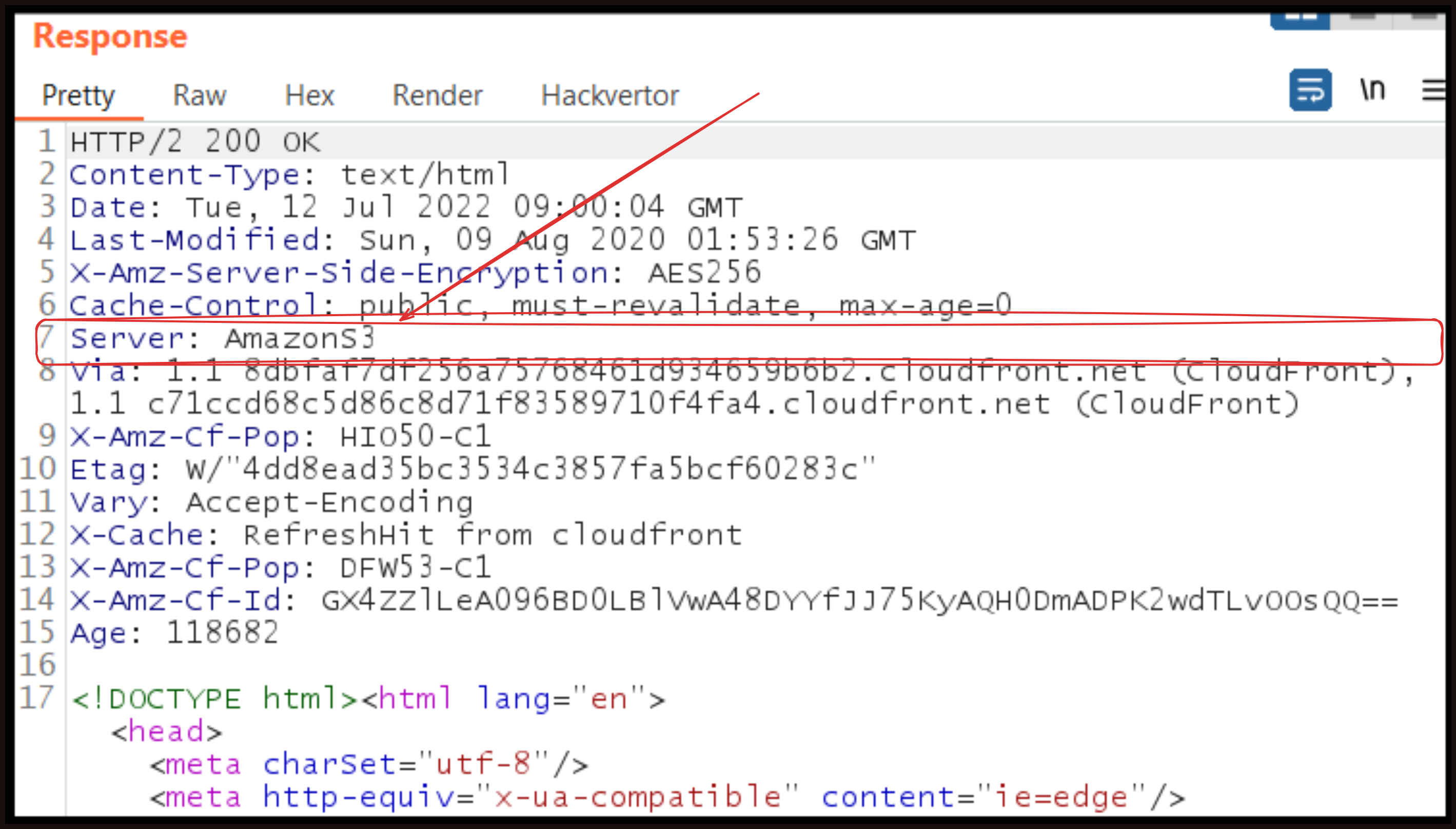 image source: google
Lab Time!!
Let’s first setup the lab environment first to understand security issues in a safe, controlled environment by hacking the pygoat web application. We have 3 labs given officially by pygoat to practice so we will see this.
Start the pygoat with the same process which I shared previously in week 11. Login to portal with the given credentials and hover to the “Security Misconfiguration OWASP 2021 top #5”.
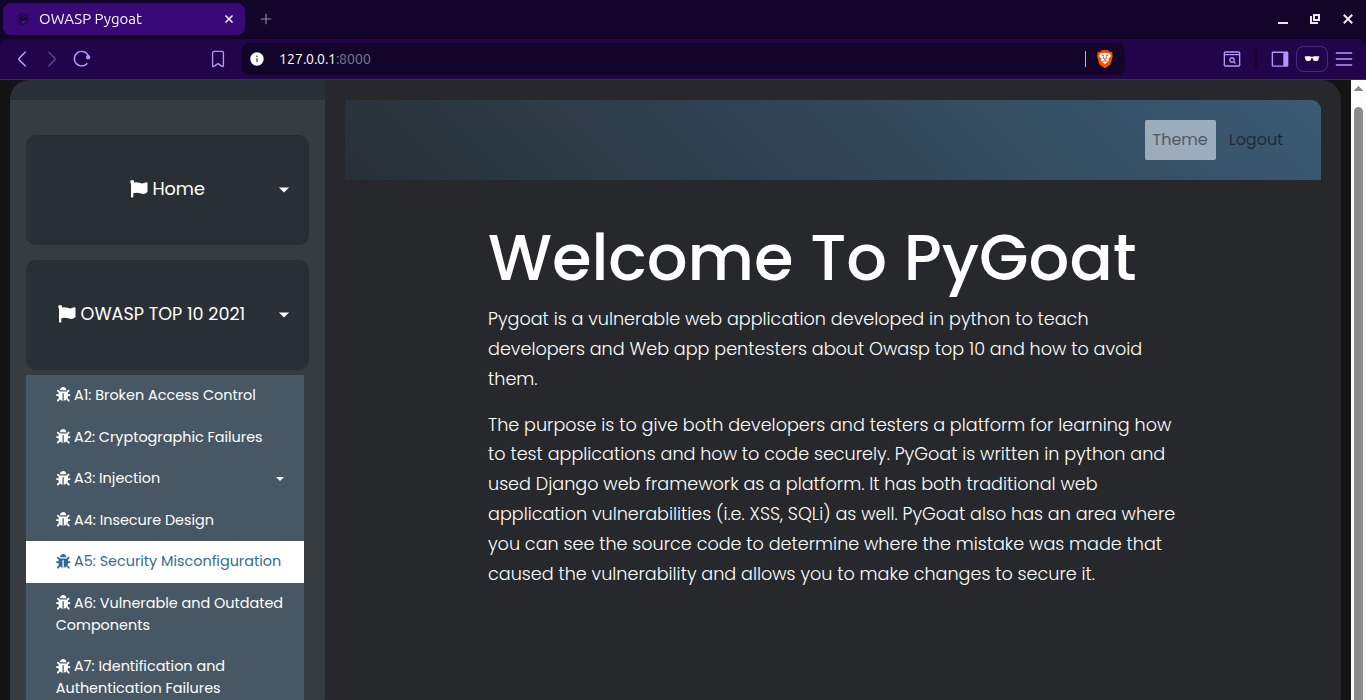
LAB #1
In Lab 1, you can see that only the admin is allowed to see the secret key on the website. So, in misconfiguration, we learned about security, and now we will play with that.
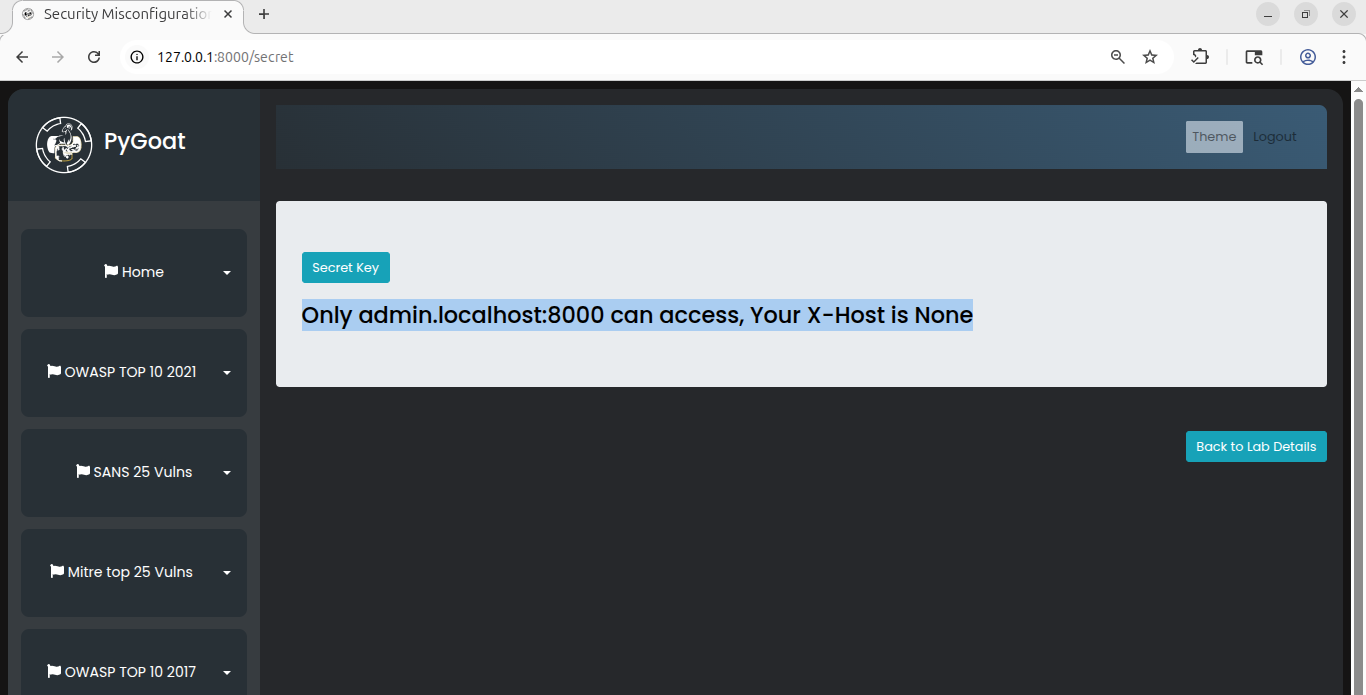 As you can see, a hint is given to us, so we have to do this by capturing the request using a proxy (Burp Suite). As you can see, there is no such header as
 X-Host in the http request.
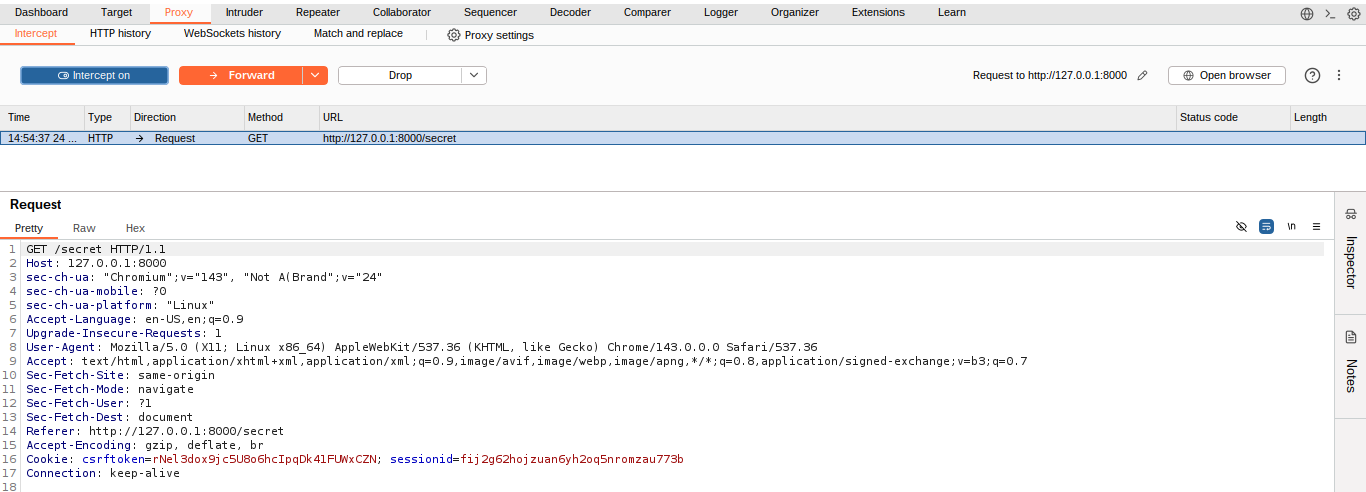 Now we simply need to add the header
 X-Host: admin.localhost:8000.
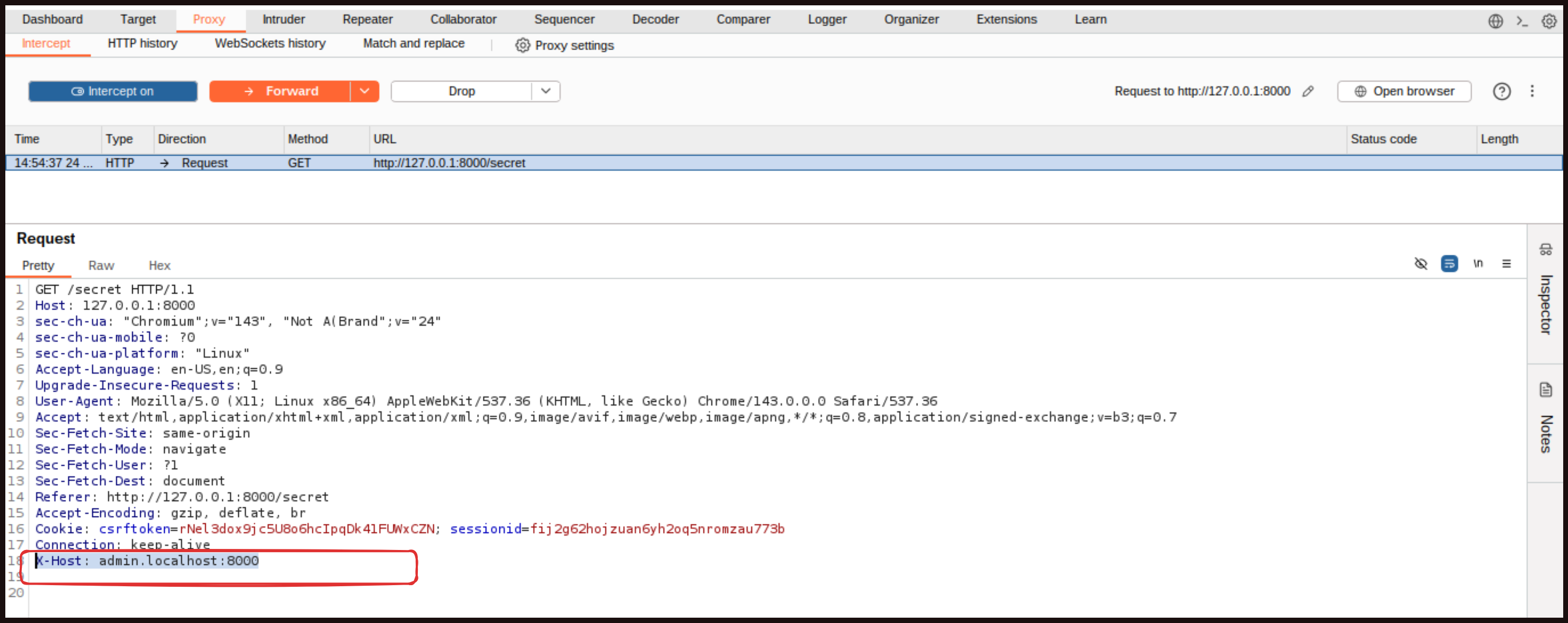 You can also edit this in Repeater as well, but it is okay to do it directly here. Now forward the request and turn off intercept.
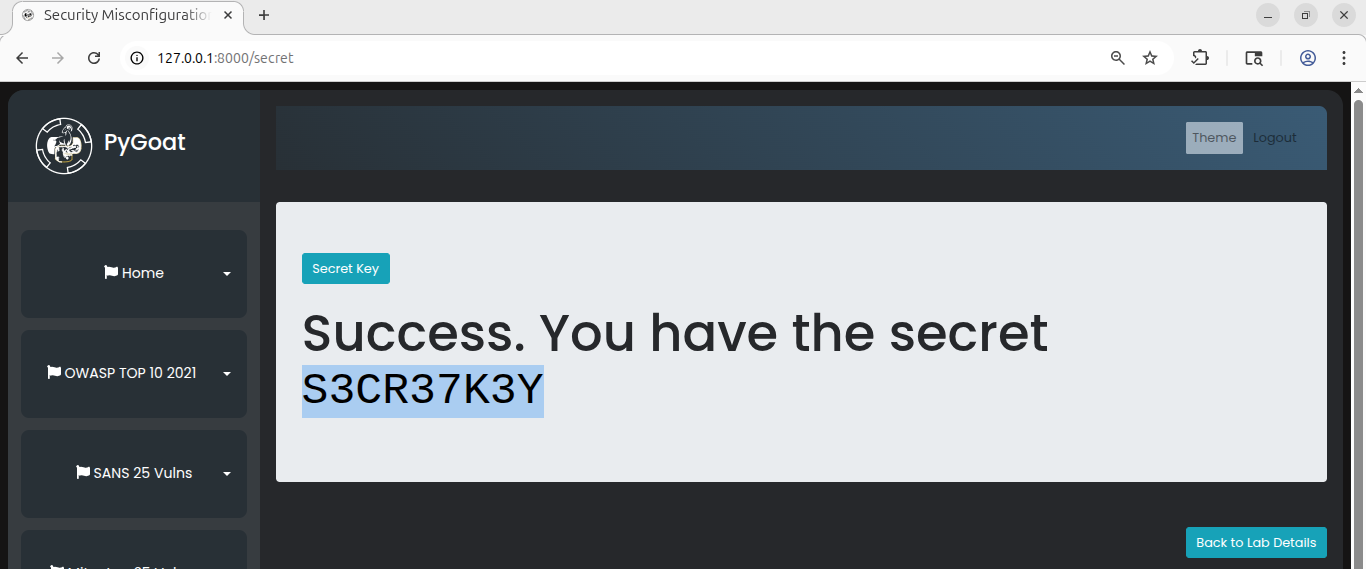 We got the secret flag.
Overall, our learning here is that security headers should only be edited or configured on the server side, not on the client side as we did here, which is not secure. Think like a hacker, because they can do the exact same thing to exploit such misconfigurations.
LAB #2
This lab teaches us the importance of setting DEBUG=False in production. As we studied and already know, DEBUG=True helps us during the development stage for debugging purposes, so it is better to keep it enabled only in development. However, if it remains misconfigured at the production level, a huge amount of system and tech stack information can be leaked about your site.
So, let us look at this practically.
Lab 2: One of the features of having DEBUG=True is that it dumps a lot of metadata from your environment, including the entire settings.py configuration, when an exception occurs.
Can you trigger a 500 error and get the SENSITIVE_DATA?
Solution: Access Lab 2 and try anything. For example, I am trying to access the admin page:
http://127.0.0.1:8000/data_exp_lab/admin
Or you can try any random text after /data_exp_lab. You will see the debug information displayed.
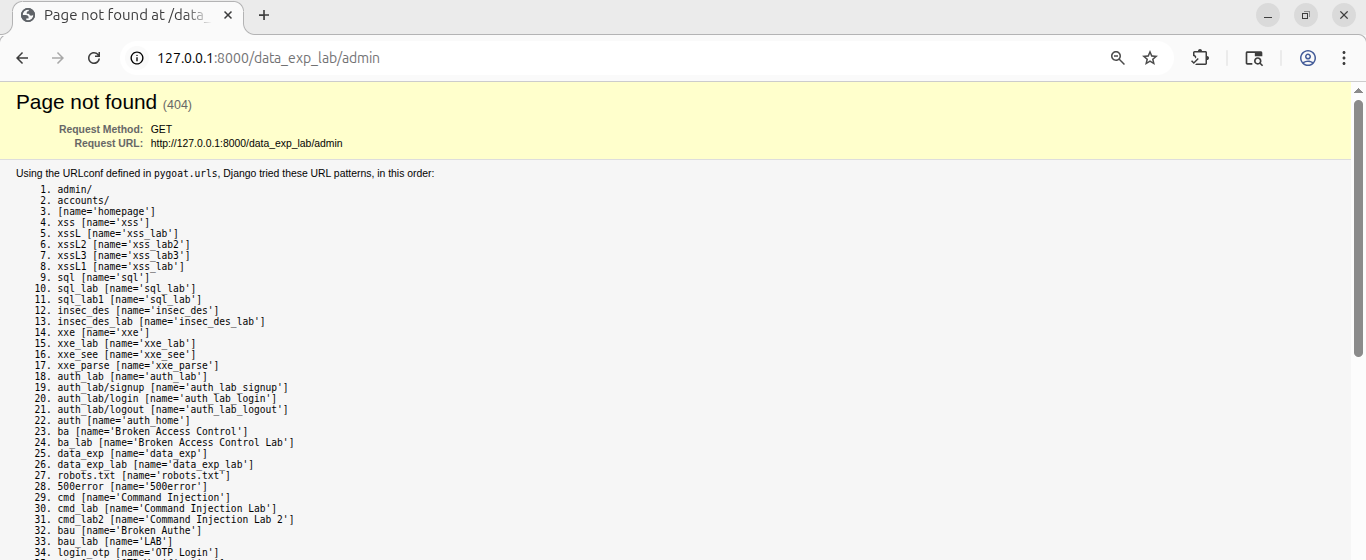 Now this exposes too much information about our website. To solve the lab, it asks us to find a 500 error. Well, it is simple. We can try accessing different pages, but here I am going straight to the point because I have already tried and you can try too. Above, we can see many URLs, but if you look down below at line 28, you will see
 /500error.
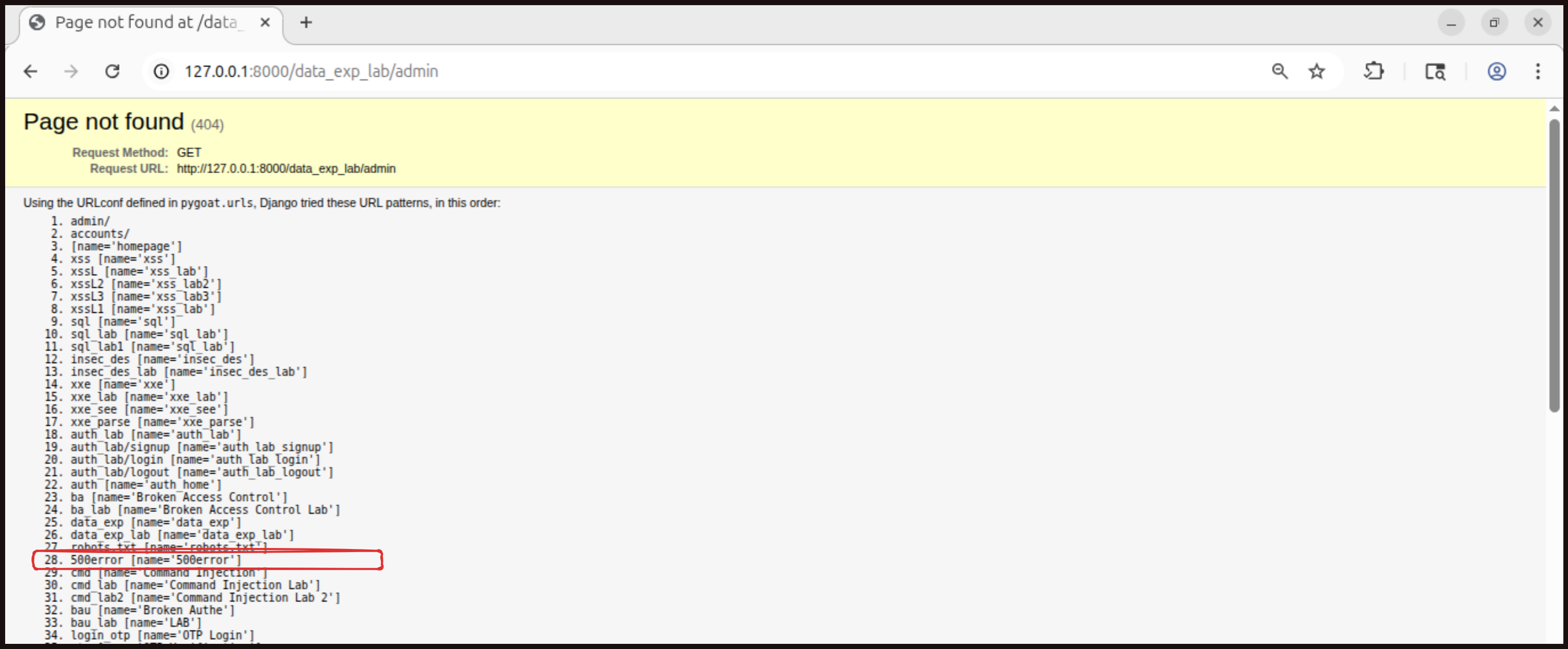 Try
Try http://127.0.0.1:8000/500error in the URL bar.
Now press CTRL+F and search for SENSITIVE_DATA.
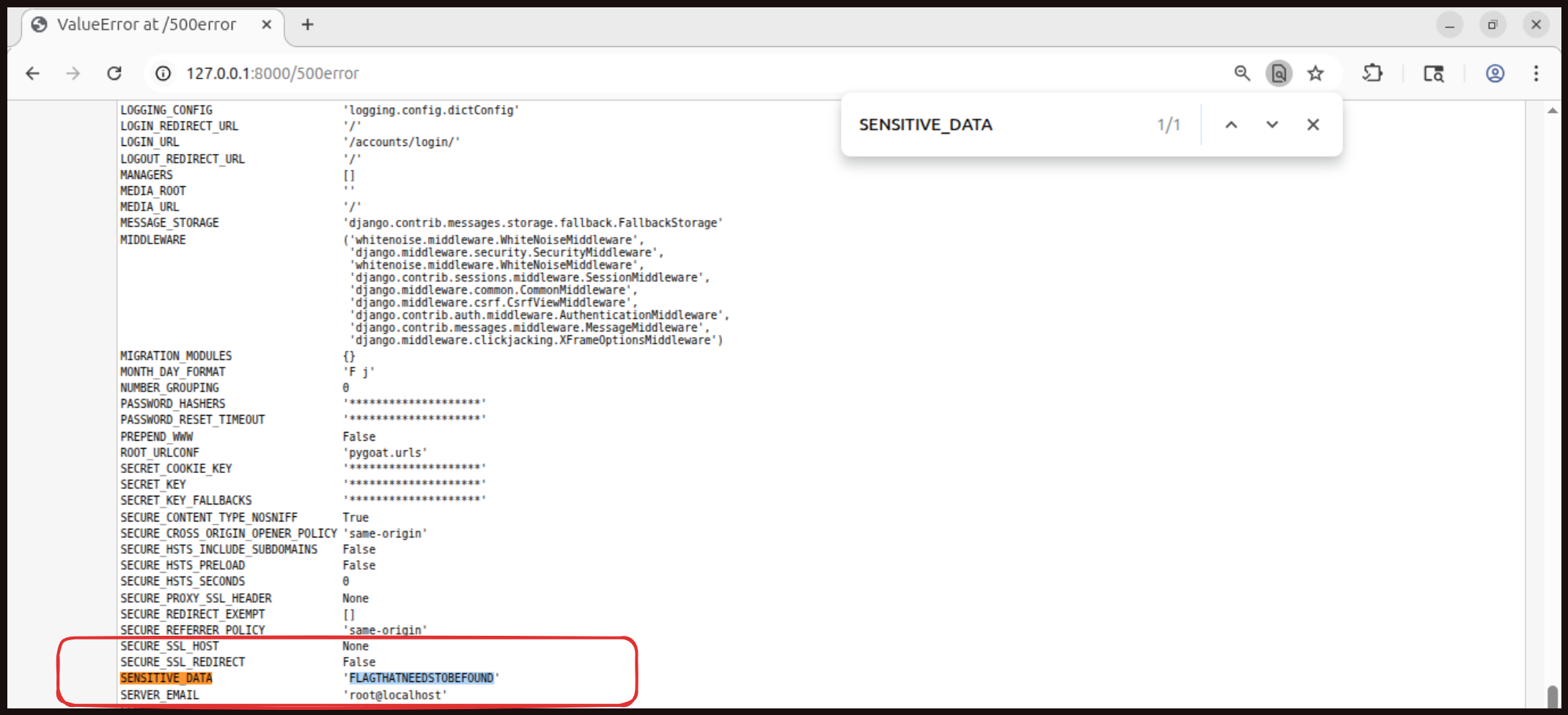 And we got the flag
 FLAGTHATNEEDSTOBEFOUND.
Lab #3
I would encourage you to complete Lab 3 on your own. It follows similar principles as the first two labs and is designed to be beginner friendly. Practicing these techniques will help solidify your understanding of Security Misconfiguration vulnerabilities and how they can be exploited.
Defense Time!!
Securing the Admin Interface
The admin interface in your website makes it easy to manage content, users, and various aspects of your application, but it also provides significant security risks that need to be carefully considered. What if an attacker managed to gain credentials to access it? The consequences could be catastrophic, as admin interfaces typically provide access to sensitive data and powerful functionality. Because of these risks, it is a good idea to host your admin website on a completely different server and restrict access to it using network level controls such as IP whitelisting or VPN requirements.
Adding multi factor authentication (MFA) to your admin interface is also a very good idea. MFA provides an additional layer of security beyond just a password, making it much harder for attackers to gain unauthorized access even if they manage to steal or guess admin credentials. If an attacker was to somehow get username and password credentials to access that admin interface, then it would give them full access to the database and potentially allow them to modify or delete critical data, create new admin accounts, or completely take over your application. MFA significantly reduces this risk by requiring a second form of authentication that the attacker is unlikely to have.
If some of these security measures will take a while to implement due to technical or resource constraints, then initially you should, at the very least, change the URL path used for the admin interface from the default one. For example, instead of using “/admin” or “/administrator”, use something less predictable like “/management-portal-xyz123”. This should not be considered a strong defense on its own, and it is definitely more of a short term measure rather than a permanent solution, but it does help by preventing automated scanners and casual attackers from easily finding your admin login page.
Implementing Secure Configuration in Django
Now let us talk about implementing secure configuration practices in your web application. We are going to look at fixing some common security misconfigurations that often appear in web applications, particularly when using frameworks like in Django. This includes addressing verbose errors, implementing useful web response headers, and securing the admin section of your website.
Securing Your Development Environment
In your development environment. When you are developing locally, you might not be using TLS by default, which means your local site runs on HTTP not on HTTPS. It is a good practice to fix this so that your environment closely mirrors production. There are packages available like django-sslserver that you can install using pip, and a certificate will be created for you automatically. Running security checks is also important.
Implementing Security Settings
When running Django’s security check command, you will get several recommendations to address. The first is SECURE_HSTS_SECONDS, which sets the Strict Transport Security header telling browsers to only use HTTPS. Be careful though, if HTTPS becomes unavailable, browsers will not access the site at all. A common value is one year in seconds. Next is SECURE_SSL_REDIRECT, which when set to True redirects all HTTP requests to HTTPS. You should also generate a new random secret key to replace Django’s default one, though be aware this will make any previously encrypted data unreadable. Set SESSION_COOKIE_SECURE and CSRF_COOKIE_SECURE to True so these important cookies only transmit over HTTPS. For the Server header that reveals software information, you will need to create middleware code to modify its value since Django does not allow complete removal. Most importantly, set DEBUG to False in production. When DEBUG is True, error pages expose directory structures, code snippets, computer names, path variables, and settings file contents, all of which help attackers. Finally, your admin interface should ideally be on a separate server with restricted access, or at minimum, change its URL from the default path, though this is just a short term solution. Django makes these configuration changes simple through flags in the settings file, and properly configured headers are critical to browser security.
Mitigation Strategies in Short!!
Below I have collected and summarized in simple points some mitigation strategies provided by different source such as OWASP to follow, how security misconfigurations happen and how proper controls can prevent them.
- Avoid Using Default Settings: Many systems come with default usernames, passwords, and configurations that are well known to attackers. Always change default credentials, disable sample pages, and remove unused features before deploying any application or server.
- Apply Least Privilege Access: Users, services, and applications should only have access to what they truly need. Do not give admin or full access unless it is absolutely required. Regularly review permissions and remove access that is no longer needed.
- Keep Systems and Software Updated: Outdated software, frameworks, and libraries often contain known security flaws. Make sure to apply security patches and updates on time for operating systems, applications, and third party dependencies.
- Disable Unnecessary Services and Features: Running unused services, open ports, or enabled debug modes increases the attack surface. Turn off anything that is not required in production, including debug settings and detailed error messages.
- Use Proper Error Handling and Logging: Error messages should not expose sensitive information such as system paths, stack traces, or credentials. Configure applications to show generic errors to users while logging detailed errors securely for administrators.
Only OWASP can explain better then me so I highly recommend to visit and read OWASP official: https://owasp.org/Top10/2021/A05_2021-Security_Misconfiguration/index.html
What next!!
Okay Everyone, that’s it for this week and for this series. We have come so far to the end of the series. I can’t believe it myself, and I never thought that I would have this much energy to complete this series. To be honest, I had not planned it, I just started and then tried my best to do research for each post, note everything, do the practical work first, then write, add it to the blog, and upload it on time every week. Overall, I finally did it. If you are here, congratulations! I am proud of you. You did it till the end with me. Thanks for being with us on our 12 week long journey. Wishing you the best of luck in your future coding journey. I am adding some resources which you can follow in your future secure coding journey, so please look at them below:
Resources
Below I am sharing some resources which you can study or follow in your future secure coding journey:
- OWASP Top 10: https://owasp.org/Top10/2021/
- Secure Coding Principles (python edition) Book:
- OWASP Developer Guide: https://devguide.owasp.org/
- Designing Secure Software: A Guide for Developers by Loren Kohnfelder: https://www.amazon.com/Designing-Secure-Software-Guide-Developers/dp/1718501927
- Clean Code Principles And Patterns Python Edition Petri Silen: https://leanpub.com/cleancodeprinciplesandpatternspythonedition
- Snyk blog - Python security best practices cheat sheet: https://snyk.io/blog/python-security-best-practices-cheat-sheet/
That’s what I have for now. In case there is any update needed or I find some interesting resources, I will add them here. Or maybe, if I find some time and energy to continue the blog again at an intermediate level, I will do so, but I can not say that for certain.
I hope you have liked it so far. If you want to support me (Option 1) you can buy me a coffee https://ko-fi.com/C0C31IDMWJ OR (Option 2 - Free) Please send me a short feedback message on LinkedIn if you found this helpful. I will be really thankful to see that it helped someone + If you have any questions, recommendations, or if you find any misinformation in the blog and want to report it to me, please feel free to reach out to me on LinkedIn: https://www.linkedin.com/in/aziz-u000/