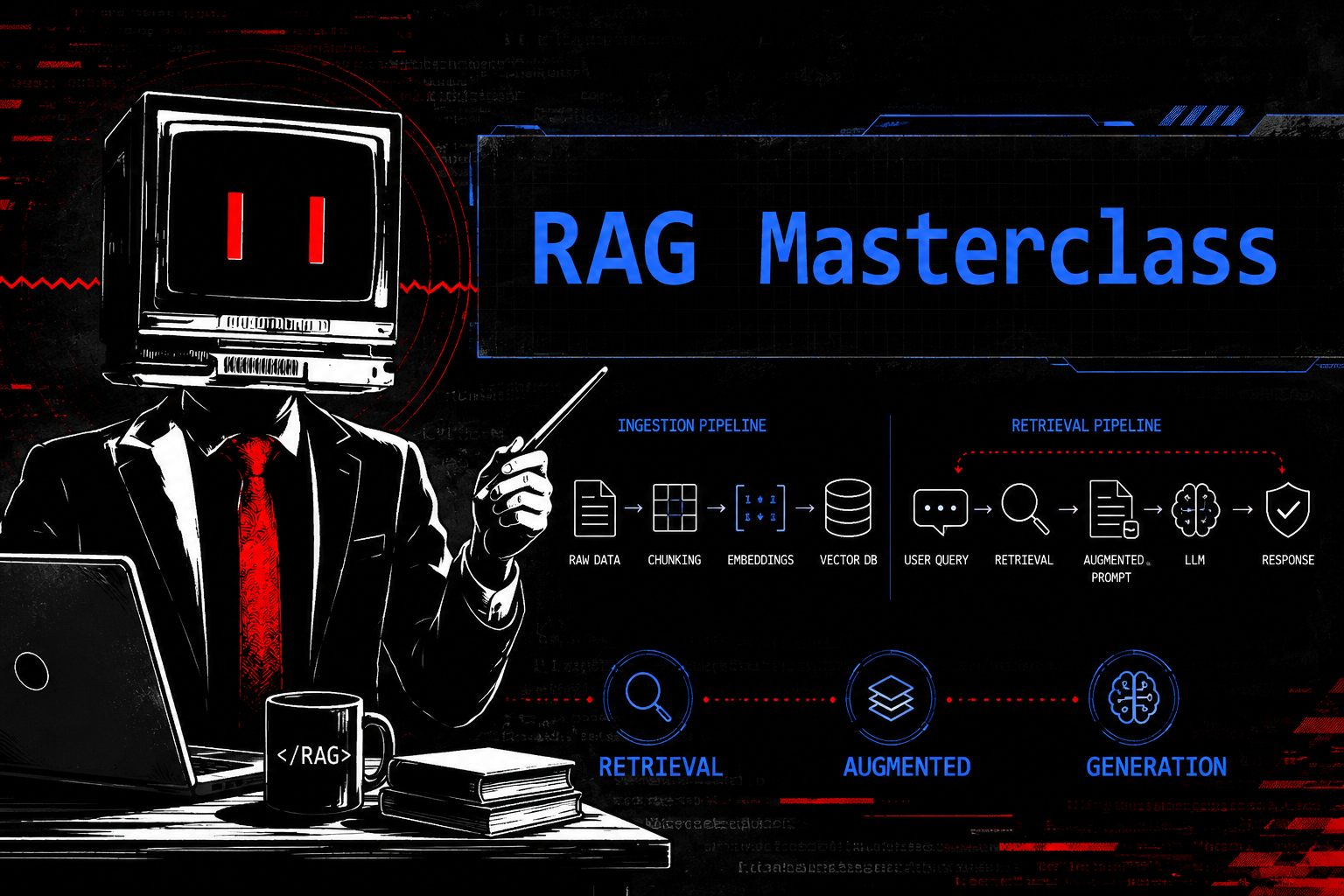
Hi everyone, today we are going to learn about RAG technique. We will be learning the basics of RAG, starting from why we use RAG, its benefits, the workflow, and the architecture of a RAG system from a non technical perspective so everyone, even non techies, can understand the concept very easily. By the end of this post, you will be confident enough to understand and explain the RAG system as well.
Before delving into RAG first we need to understand some terms that you will hear most of the time in the AI ecosystem, such as AI, LLMs, Agents, Agentic AI, Machine Learning (ML), Deep Learning, GenAI, and including RAG. Let us understand some of these terms in a very simple way before moving on.
AI: AI - Artificial Intellegence is basically about enabling our computer systems to perform tasks that normally require human intelligence. Its as simple as that. For example, think about traffic management. Traffic lights are programmed to work automatically by switching between red, yellow, and green at the right time. People follow these signals without needing a traffic police officer to manually control the traffic all day.
Now, imagine someone breaks a traffic rule. A CCTV camera can automatically detect that violation using AI based computer vision and object detection techniques. Earlier, this work had to be done manually by traffic police officers who had to observe every vehicle, identify violations, and take action. Doing this manually is time consuming, expensive, and difficult to manage, especially in busy cities. AI helps automate many of these tasks, making the system much more efficient and these system can be ruled based programmed or trained on huge data.
Now AI is a very broad field. Some AI systems work using predefined rules and algorithms such as the first part of the Traffic light system example, while others learn from data, take action and improve their performance over time which we have discussed in the 2nd part of the example. We will learn those learning based systems in the next sections.
ML and LLMs: Machine Learning (ML) is a subset of AI where we train our systems using huge amounts of data so they can learn patterns and make predictions or generate responses. The best example here is LLMs (Large Language Models). Some of the most popular LLMs are ChatGPT, Claude, and Gemini. These models are trained on huge amounts of data that may include millions of books, articles, blogs, research papers, and publicly available web pages. The more high quality data you have, the more potential your model has to perform better. Now you may understand why people often say, “Data is the fuel for Machine Learning” or “Data is the new fuel of the future.”
Machine Learning (ML) is a subset of AI. So, all ML is AI, but not all AI is ML. Keep this in mind because many people get confused about this.
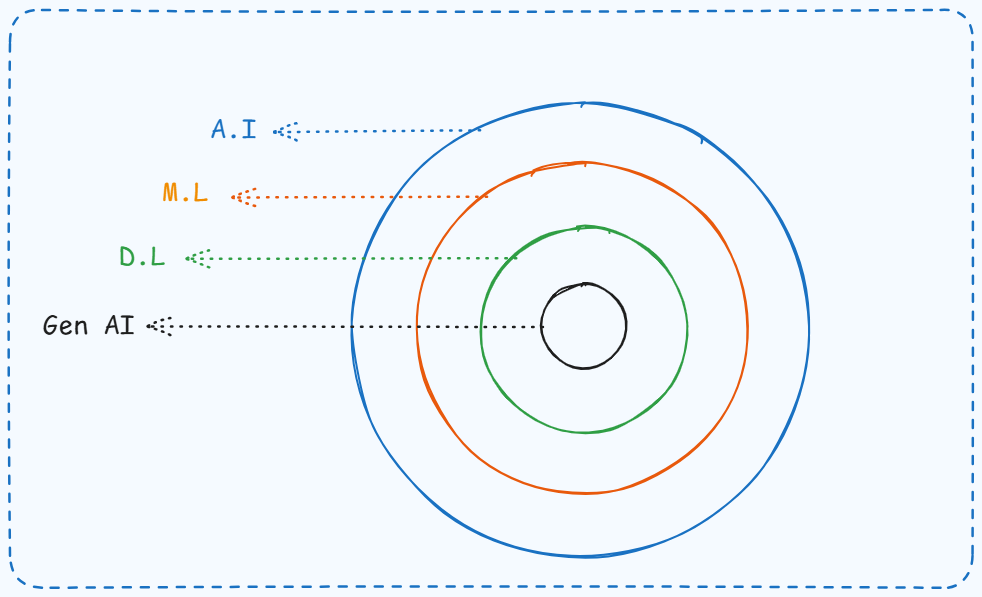 There are many other concepts as well, such as Deep Learning, Generative AI (GenAI), and more. But for this article, we only need to understand the basics of AI and LLMs. We will also cover some additional concepts while learning about RAG. For now, this much knowledge is enough for you to comfortably follow the rest of the post.
As we have discussed, LLMs are very powerful. Whatever you ask, they will usually give you an answer, and most of the time it is quite good. However, LLMs also have some important limitations.
Such as:
- Limited knowledge after training: LLMs do not automatically know about events that happened after their knowledge cutoff or training period. For example, if you ask Claude 4.5, “What is your last training date?” it will tell you the latest period of information it was trained or updated on. Anything that happened after that may not be part of its knowledge unless it has access to external sources.
- No access to your private data: Many organizations, governments, hospitals, banks, and military departments have sensitive or confidential information that they cannot use to train a public LLM. However, they still want the AI to answer questions using their own internal documents and knowledge.
- Hallucination: Hallucination means the model generates information that sounds very confident but is actually incorrect or completely made up. In other words, the output may look accurate, but in reality, it is not. This is another major problem that we need to solve.
There are other limitations as well, but these three are among the most important ones and are enough to understand why RAG was introduced and this is where RAG helps fill those gaps.
RAG:
RAG stands for Retrieval Augmented Generation. It is a technique that allows us to use our own private or company internal data with an LLM, We inject that data in the flow without actually training the model on that data or permanently sharing it with the model. Now, how does this work? Well, we will understand the complete architecture later. For now, just remember these three words: Retrieval, Augmented, and Generation. You will understand what each of them means when we go through the RAG pipeline.
Let us understand this with the example of a TikTok Customer Support Chatbot.
Companies can build LLM based applications for external users, such as customer support chatbots. A user can ask a question related to the TikTok platform, for example, "Hey, what is the Content Originality Policy on TikTok?" The chatbot can then provide a detailed and highly accurate answer.
Now, if you ask the same or a similar question to a general purpose AI model such as ChatGPT, it may answer using its training knowledge or publicly available information if it has access to it. However, it cannot always be as accurate because it does not have access to TikTok’s internal knowledge base or private documents.
This is where RAG comes in. The chatbot first retrieves the most relevant information from TikTok’s own private collection of documents based on your question. It then provides that information to the LLM, which generates a much better and more accurate response than a general purpose model could.
Today, many websites and mobile applications have customer support chatbots that use RAG behind the scenes. This allows users to ask questions and receive faster and more accurate answers. If you have not noticed one before, visit the website of a bank or any large company. There is a good chance you will find a chatbot there. Try asking it questions related to that company or its services.
One interesting thing you may notice is that if you ask something unrelated to that platform, the chatbot will usually refuse to answer or tell you that it can only help with topics related to that company. This is because it is designed / instructed specifically for that purpose. In the same way, companies also build internal chatbots with RAG for their employees.
For example, an employee might ask, "What is the password policy at our company ABC?" The chatbot can retrieve the exact information from the company’s internal documents and provide the correct answer.
A general purpose model such as ChatGPT cannot answer this question because it has no access to your company’s private policies or confidential documents. With RAG, the company can securely use its internal documents to answer employee questions without using those documents to train the public model. This also helps reduce hallucinations because the model is generating its answer from relevant company information instead of relying only on what it already knows. Now I hope you have a basic understanding of what RAG is. Next, let us understand how the complete RAG workflow works.
RAG Architecture
There are multiple RAG architectures used by different organizations. The architecture depends on the organization’s requirements and use case. However, in this post, we will focus on the standard (Naive) RAG architecture because it is the easiest one to understand and helps us learn the overall workflow.
The RAG pipeline is generally divided into two main parts:
- Ingestion Pipeline
- Retrieval Pipeline
Ingestion Pipeline
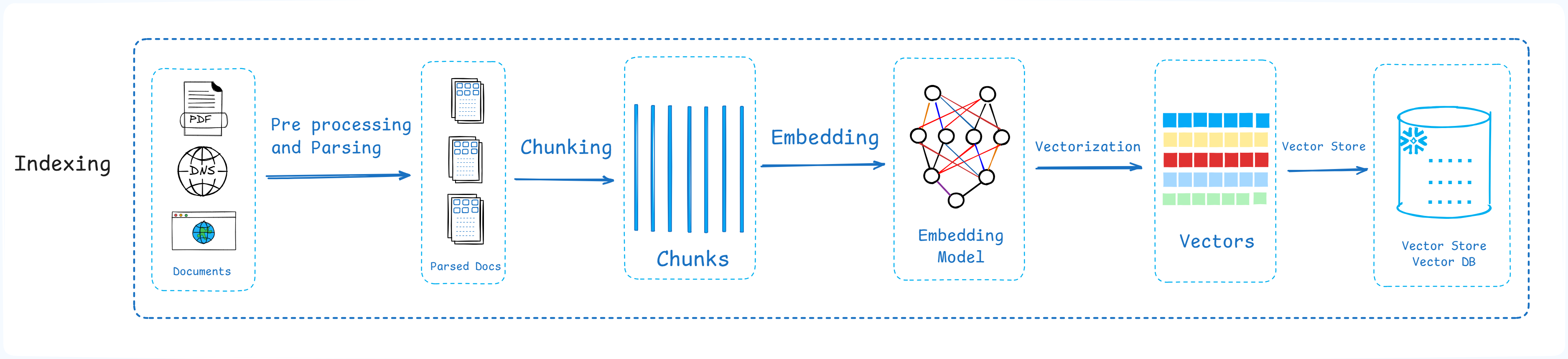 The
The Ingestion Pipeline starts with the data. We first collect documents in their raw form, such as PDFs, Word documents, web pages, or text files. The text from these documents is then split into smaller pieces called ‘chunks’. There are different chunking techniques, but we do not need to go into those details here.
Next, each text chunk is converted into embeddings. You can think of embeddings as numerical representations of text that capture its meaning. They are not just random numbers. They help the system understand which pieces of text are semantically similar to each other. These embeddings are then stored as vectors inside a ‘Vector Database / Vector Store’, where they can later be searched efficiently.
Retrieval Pipeline
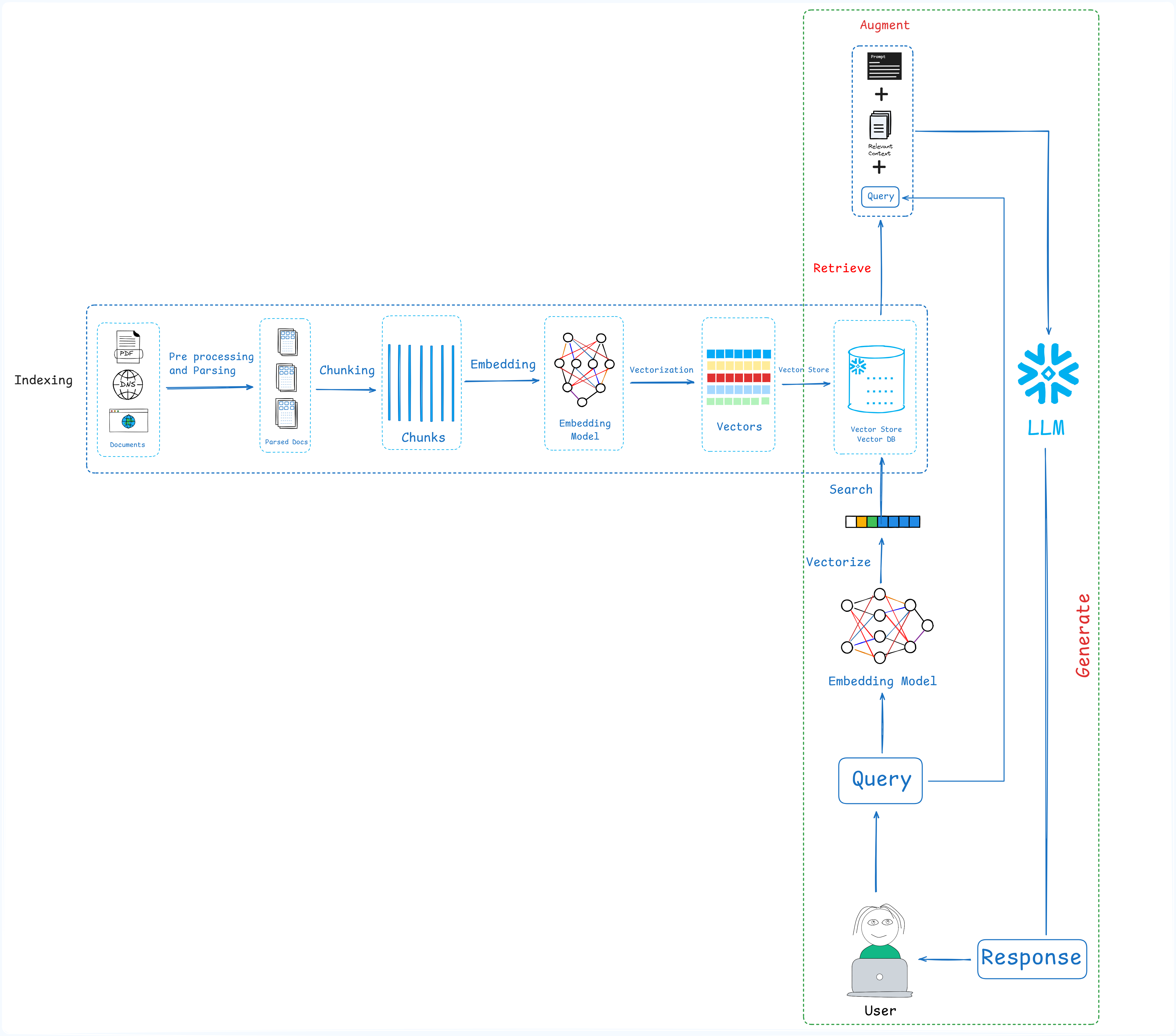 The user query the application, the information retrieved from the company’s knowledge base is combined with the user’s original question and sent to the LLM. Because of this additional context, the LLM can generate a much more accurate response, even if that information was never part of its original training data.
Keep in mind that both the Ingestion Pipeline and the Retrieval Pipeline contain many advanced and technical steps as you can see the fig above. Covering them in detail would make this post much longer, so we will only focus on the overall workflow
Now let us understand both pipelines in a more simple way.
The Ingestion Pipeline starts with the data. We first collect documents in their raw form, such as PDFs, Word documents, web pages, or text files. The text from these documents is then split into smaller pieces called chunks. Next, each text chunk is converted into embeddings. These embeddings are then stored as vectors inside a Vector Database, where they can later be searched efficiently.
The Retrieval Pipeline starts when a user submits a query, it first passes through input guardrails. These guardrails help detect inappropriate, unsafe, or malicious input before it reaches the retriever or the LLM. They add an extra layer of protection, although no security system is perfect and, in some cases, they can still be bypassed. Maybe we will cover topics like RAG poisoning in a future post.
After that, the user’s query is also converted into embeddings. The system then performs a ‘vector similarity search’ to find the chunks whose meanings are most similar to the user’s question. Instead of searching for exact keywords, it searches based on semantic meaning. The most relevant chunks are selected and combined with the user’s original question and other system instructions to create an augmented prompt. Augmented prompt is something like that: Original User Query + Retrieved Context + Additional Instructions. This augmented prompt is then sent to the LLM.
Once the LLM generates a response, it can pass through output guardrails. These guardrails help remove sensitive information, PII, or anything else the organization does not want to expose. Finally, the safe / desired response is returned to the user.
This was a basic overview of the RAG architecture and its overall workflow and I hope you got the idea of the word RAG which is Retrieval Augmented Generation and we have explained this in a very easy way.
Thanks for your time and I hope you like it.